Modax WMS for Microsoft Dynamics 365 Business Central
A regulated warehouse,
run from Business Central.
License plates, lot and expiry control, quality release with electronic signature, FEFO picking and full lot traceability. Modax WMS runs inside your Business Central tenant and puts every step on the handheld.
- Built for GMP manufacturers and distributors
- One system to validate
- From USD 350 per month
Why Modax WMS
The warehouse a quality auditor expects, without a second system.
Most warehouse add-ons for Business Central move stock faster. Modax WMS also answers the questions a regulated site is asked: who released this lot, why was a newer lot picked, where did the supplier lot go.
Compliance is part of the product
Stock status, a two step quality release, electronic signatures and segregation rules are settings you switch on. No custom code to maintain or to validate.
A license plate warehouse
Every pallet, case and tote is a license plate with its quantity, lot, expiry date and status, and the pallets you produce carry a GS1 SSCC. The warehouse model of Dynamics 365 Finance and Operations, inside Business Central.
One system to validate
The handheld is a screen of Business Central. Every prompt, check and posting runs in your tenant: no second database, no sync, no separate app version to qualify.
A walk through the warehouse
From the dock to the customer, on the handheld.
These are screens of the product, not drawings. Each one is a step an operator takes.
The trailer is inspected before anything is registered
- Receiving starts with your own checklist: seal, cleanliness, condition of the load, temperature.
- Registration waits for the inspection. A delivery that was not inspected is flagged and cannot be registered.
- A No answer puts the delivery on hold. The inspection is a record of its own: who inspected, when, and every answer.
Lot and expiry, captured at the door
- Lot and expiry date are entered at receipt and checked against the shelf life rule of the item.
- A GS1-128 label of your supplier is read in one scan: item, lot, expiry date and quantity, without a keystroke.
- The receiver works in bags or drums, the system keeps kilograms.
- Every pallet gets a license plate and its label, and it is on hold from the first second.
Nothing moves on before the release
- Received and produced material waits on hold with a quality order and your own inspection questions.
- Quality Control records the result, Quality Assurance releases. One person holding both roles does it in one step.
- Each decision is signed with a PIN and a stated meaning: who signed, when, and what.
A long test does not block the dock
- Some materials take days to test. Their pallets go to the storage bin on hold instead of waiting at the dock.
- On hold in its bin means no pick is sent to it. Quality releases the lot where it stands, and nobody moves the pallet twice.
- It is a switch on the quality policy, chosen per item: one material is put away on hold, another waits at the dock for its release.
The right bin, or a clear refusal
- Storage rules are configuration: allergen, organic, cold chain, or classes of your own.
- The handheld proposes a compliant bin. A bin of the wrong class is refused, with the reason and the bin to use.
- Part of a lot can be on hold while the rest stays available: the same lot, a plate of its own, its own status.
First expired, first out. On every pick.
- One trip serves several orders in walking order, the rush order first, one labelled pallet per order.
- A newer lot needs the override right and a reason code. The log keeps both lots, the user and the time.
- Order notes travel to the picker, and an expired lot is never offered to a pick.
- A customer can ask for a minimum remaining shelf life. Lots below it are passed over when the order is allocated and refused at the scan.
From bulk to finished goods, lot by lot
- Components are picked to the line by lot, first expired first.
- Production starts with a signature. Each batch is one lot, numbered by your own mask, on a GS1 SSCC pallet label.
- Output is born on hold with its quality order, and consumption posts with the lots that were picked. The genealogy is complete without extra entry.
- After the run the line is cleared on the handheld and the clearance is signed: what is really left on each staged pallet is confirmed, and the difference is consumed with its lot.
- The batch record is one document: signatures, component lots, output pallets, quality results and non-conformances.
- Kits are built on the handheld too: a kit lot of its own, linked to its component lots.
Cartons, parcels and truck loads in one flow
- Direct to consumer orders are packed into cartons, parcel orders ship on their own, truck orders go on a load with a bill of lading.
- The carrier label of a parcel is scanned onto its carton, and the tracking number goes on the shipment.
- The packing slip and the posted shipment carry the lots that were actually scanned.
- A load can be inspected before it goes on the truck. The seal number goes onto the bill of lading.
Weighed on the handheld, printed on the bill of lading
- A pallet is weighed and measured on the handheld. A carton is weighed when it is closed at packing.
- Both screens show what the items on the unit add up to, so a wrong weight is noticed at the scale.
- A unit nobody weighed carries the calculated weight, and the bill of lading marks it as calculated.
- The bill of lading prints every pallet with its weight, its dimensions and its SSCC, and the totals of the load.
- Each pallet that ships gets a shipping label with its SSCC as a GS1-128 bar code.
The documents that leave with the load
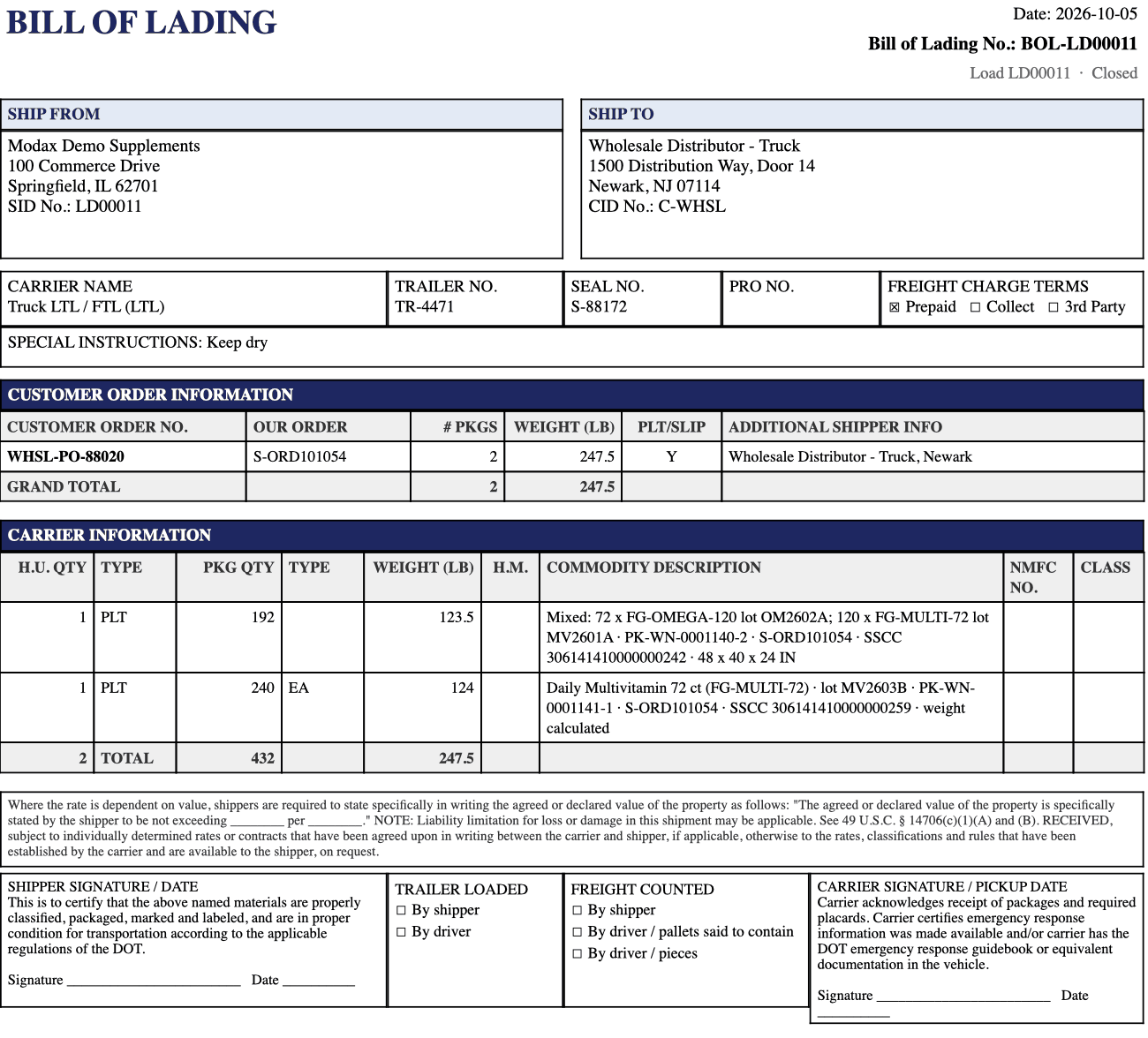
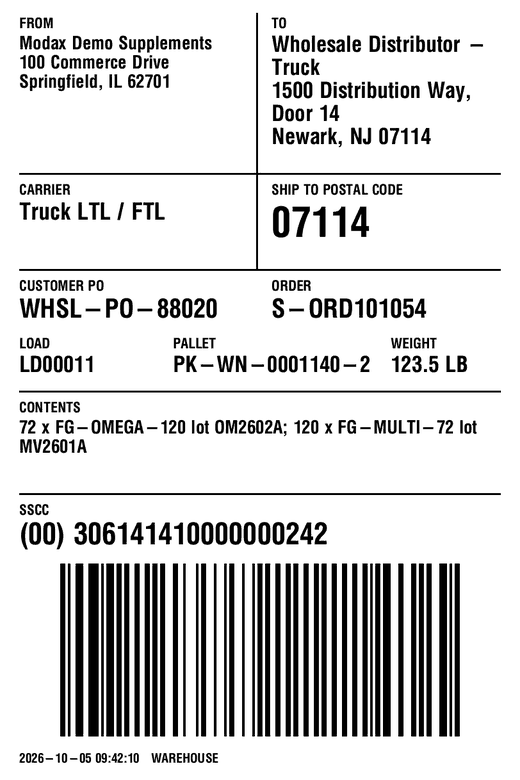
A mock recall takes minutes.
- Trace a supplier lot forward to every finished lot, kit and customer shipment, or a finished lot back to its components.
- Mass balance comes from the same ledger: received, consumed, produced, shipped and on hand.
- One recall screen answers at once: the customers to notify, the pallets still in the warehouse, and one action that puts what is left on hold. The same lines print as the recall report.
- The trace rests on the standard entries of Business Central. Modax WMS makes sure the lots are on every posting.
One supplier lot, followed forward
An example of the record Business Central holds after a production run with Modax WMS.
Built for regulated operations
What an auditor asks for is already on record.
Dietary supplements, food and cosmetics: the rules differ, the questions are the same. Who decided, with which right, and where is the evidence.
A newer lot was scanned. The handheld names both lots and asks for the reason before it goes on.
Status control
Available, Hold, Quarantine, Rejected, Expired. Transitions are controlled and a pick is only ever sent to available stock. A posting made in Business Central outside the handheld cannot take stock that is on hold, and a lot that is entirely on hold shows as blocked on its lot card.
Two step disposition
Quality Control records, Quality Assurance releases. The roles are set per worker and every change of a role is logged.
Expiry control
Expiry Watch shows what expires next and what it is worth, blocks expired lots and starts the re-test, with a new date when Quality sets one.
Non-conformance
The material review in one record: return to vendor, scrap, rework or use as is, with containment, justification and history.
Electronic signature
Compliance PackQuality decisions, status changes, production starts and line clearances are signed with a PIN and a stated meaning. A PIN locks after repeated failed attempts, and every attempt is on record. Designed for 21 CFR Part 11 environments.
Segregation rules
Compliance PackAllergen, organic and cold chain classes on items and bins. The put-away follows them and refuses what does not fit.
Audit trail and exports
Compliance PackEvery movement, override and status change with user and time, ready to filter and to export for an audit. Every label print and reprint is logged, and an access review report lists what each worker may do.
Validation documentation
Compliance PackFunctional specification, test scripts and a requirement to test traceability matrix, delivered with every release.
How it runs
One Business Central extension. Nothing beside it.
Inside your tenant
An extension for Business Central online. No extra server, no second database, nothing to integrate. Your data stays in Business Central.
Standard postings
Receipts, shipments, production output and consumption, transfers and journals are posted as standard Business Central documents, with their lots. A reconciliation view compares Business Central with the license plates, lot by lot.
A thin handheld
The handheld shows what Business Central sends. Scanners, tablets and phones use it through Business Central, and changing a device changes nothing in the process.
Essentials or Premium
Works with both. The production functions need Business Central Premium.
GS1 pallet labels
Pallets born in your warehouse are numbered as GS1 SSCC, built from your GS1 company prefix, and carry a pallet label with the SSCC bar code, lot and expiry date. Pallets that ship get a shipping label with their SSCC as a GS1-128 bar code.
Your rules, your settings
Stock classes, inspection questions, reason codes, segregation classes, label layouts and the menu of each worker are setup pages, not development.
A home page for each role
Warehouse manager, shipping and receiving, quality and production each open Business Central on a home page of their own: the numbers that wait for them and the lists behind those numbers.
An order can come back
A sales order that changes after it went to the warehouse is taken back with one action: open picks are released, staged pallets are named, and the order leaves its load.
Ready on day one
A new company starts with a working configuration: menus, activities, number series, stock classes, reason codes and two inspection checklists to make your own.
Pricing
Priced per warehouse device, like the Microsoft license next to it.
List prices in USD per month. Devices are counted when they are in use at the same time. Workers are not counted.
Core
USD 350 per month
per Business Central production environment
- 3 concurrent handheld devices included
- 1 sandbox environment included
- Receiving, quality, put-away, inventory, picking, packing, shipping, production and kitting
Site
USD 1,800 per month
per Business Central production environment
- Unlimited handheld devices
- Everything in Core
- The better price from 33 devices
Compliance Pack
+ USD 350 per month
per environment, added to Core or Site
- Electronic signature, designed for 21 CFR Part 11 environments
- Segregation rules
- Extended audit exports
- Validation documentation with every release
Terms
Annual commitment, billed monthly, at the list price, or month to month at 20% more. 8% discount for annual prepayment. Prices are fixed during the term. See the Modax WMS Subscription Terms.
Microsoft license for the handhelds
Each handheld in use at the same time needs a Microsoft Dynamics 365 Business Central Device license, or the worker's own Essentials or Premium license. It is not part of the Modax price. Modax is a Microsoft Cloud Solution Provider and supplies it at a competitive price, or you keep your existing provider.
Label printing
Pallet and carton labels are part of Modax WMS. From Business Central online they reach the printers in your warehouse through a cloud print service. With the service we prefer, the connection is included at no charge. With a service of your choice, the connection may need additional technical work, which we quote. In both cases the subscription of the print service is paid to its provider.
Professional services
Implementation, validation support for GxP sites and training are available from Modax and from authorized partners. Connecting a scale, so that weights arrive without typing, is quoted as a project: the work depends on the scale. Ask for a quote.
For Microsoft partners
Bring Modax WMS to your Business Central customers.
Resell it or refer it. The list price is public, the partner terms are simple, and we support your first implementations with you.
Questions we hear first
Does Modax WMS replace the warehouse functions of Business Central? +
It adds a license plate warehouse on top of Business Central and posts standard Business Central documents. Finance, purchasing, sales and inventory value stay where they are.
Do the handheld users need a Microsoft license? +
Each handheld in use at the same time needs a Microsoft Dynamics 365 Business Central Device license, and any number of workers can share it. A worker who already has an Essentials or Premium license uses the handheld with that license.
What does the Compliance Pack add? +
Electronic signature, segregation rules, extended audit exports and the validation documentation for every release. Regulated sites add it to Core or Site. Sites that do not need it do not pay for it.
How do labels get to our printers? +
Through a cloud print service that connects Business Central online to the printers in your warehouse. The connection to the service we prefer is included. If you want to use another print service, we quote the additional technical work. The subscription of the print service is paid to its provider in both cases.
Can the weights come straight from a scale? +
Today the operator types the weight the scale shows: for a pallet on the handheld, for a carton at packing. A unit nobody weighed carries the weight calculated from its items. A direct connection to a scale is a services project, and the work depends on the scale and on how it connects.
How are devices counted? +
By devices in use at the same time. Fifteen registered scanners with ten in use on a shift count as ten. Workers are not counted.
Can we see it with our own process? +
Yes. Book a demo and we walk through receiving, quality, picking and traceability on the handheld, in the order your warehouse works.
See your process on the handheld.
One session: your receiving, quality and picking steps, and the trace of one lot from the supplier to the customer.